Molecular Modeling and Drug Design
  • About us
  • Research
  • Publications
  • Members
  • Webservers
  • Calendar
  • Blog
  • Benchmarks
  • ALLODD
  • Image Gallery
  • Publicity
  • Talks

Maestro ​Error: x server has no opengl glx extension

2/10/2025

0 Comments


**************************************************************
Maestro Molecular Modeling Interface
Maestro is a product of Schrödinger, Inc.
Legal notices can be viewed by clicking Help->About Maestro
**************************************************************
/bin/sh: 1: glxinfo: not found
libGL error: MESA-LOADER: failed to open nouveau: /opt/schrodinger2024-2/maestro-v14.0/lib/Linux-x86_64/gl/nouveau_dri.so: cannot open shared object file: No such file or directory (search paths /opt/schrodinger2024-2/maestro-v14.0/lib/Linux-x86_64/gl, suffix _dri)
libGL error: failed to load driver: nouveau

​Error: x server has no opengl glx extension maestro
Fix: After I executed this command, it worked fine:
export LD_PRELOAD=/usr/lib/x86_64-linux-gnu/libstdc++.so.6
 
But we need to open Maestro in the shell, for example:
cd <your path>/schrodinger20xx-x
export LD_PRELOAD=/usr/lib/x86_64-linux-gnu/libstdc++.so.6
./maestro
 
Or directly modify the Maestro startup script
vim ./maestro
Add to the first line
export LD_PRELOAD=/usr/lib/x86_64-linux-gnu/libstdc++.so.6
I tried the following and it worked

I referred to the following links
https://github.com/conda-forge/ctng-compilers-feedstock/issues/95

What worked for me is to add the following in the .bashrc script:export LD_PRELOAD=/usr/lib/x86_64-linux-gnu/libstdc++.so.6
source .bashrc 
 
Schrodinger response:
The error usually indicates that you have not installed drivers with hardware accelerated OpenGL. Try launching Maestro with the -SGL option$SCHRODINGER/maestro -SGL​

Please refer to the following KB articles for more information:
I just installed the latest version of Schrödinger software on a new computer and I am receiving some OpenGL GLX errors. What do they

Can I run Maestro on a remote machine and display to my local machine?
 
Zoe

0 Comments

Using hydrogen bond constraints vs all-atom bond constraints in GROMACS

10/9/2024

2 Comments

 
Whether one will use hydrogen bond constraints vs all-atom bond constraints in GROMACS depends on the force field to be used.

The CHARMM36m force field is the only one in Gromacs, where constraining only hydrogen bonds is mandatory (as noted in the Gromacs manual: https://manual.gromacs.org/current/user-guide/force-fields.html).

In other force fields, both hydrogen bond constraints and full bond constraints are possible, but full bond constraints are typically chosen when the goal is to simulate longer timescales within shorter simulation durations.

If your focus is on accuracy rather than rapidly reaching long timescales, it is best to use the hydrogen bond option. This approach is also applied in DNA simulations, where the hydrogen bond option was used (https://gromacs.bioexcel.eu/t/mdp-parameters-for-non-bonded-interaction-using-the-amber-force-field/6458). 

In general the option constraints=h-bonds is more compatible with other software, eg. NAMD, where particular  constraints in hbond fixes https://pubs.acs.org/doi/10.1021/acs.jctc.2c00200 are used.

Ultimatitely, the choice of whether to use constraints=h-bonds or constraints=all-bonds constraints depends on how the force field is parameterized. 

From here we can understand that common forcefields, including AMBER, CHARMM and OPLS/aa, are parametrized with hydrogen constrained bonds. Constraining all bonds should be avoided for correctness. 


Michalis and Matilde

2 Comments

How to create an image from PowerPoint without losing quality

4/8/2024

0 Comments

 
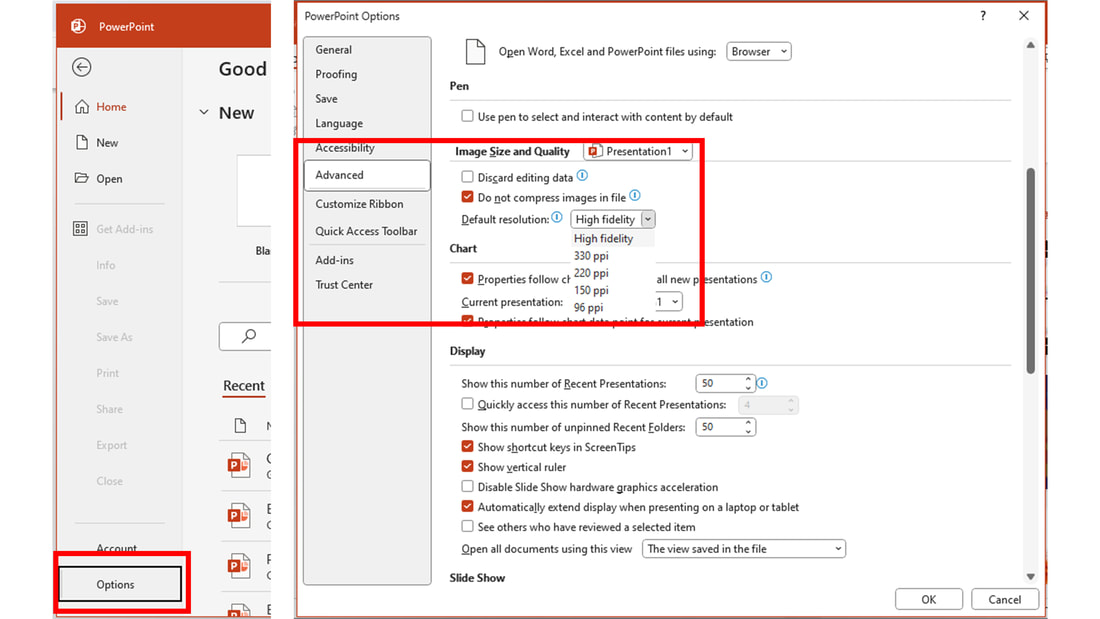
Before starting to add elements to your PowerPoint file, the options of the file in question must be appropriately set to save all pasted images in their original resolution and high fidelity. If you have a PowerPoint file with images in it already, change the file options and then import/paste the original images again into the document to preserve their original resolution, as the images that were imported before setting these quality options have already been compressed.
 
To change the file options for original image resolution and high fidelity, go to “Options” and make sure the following options are selected in the “Image Size and Quality” of the “Advanced” tab:
Picture
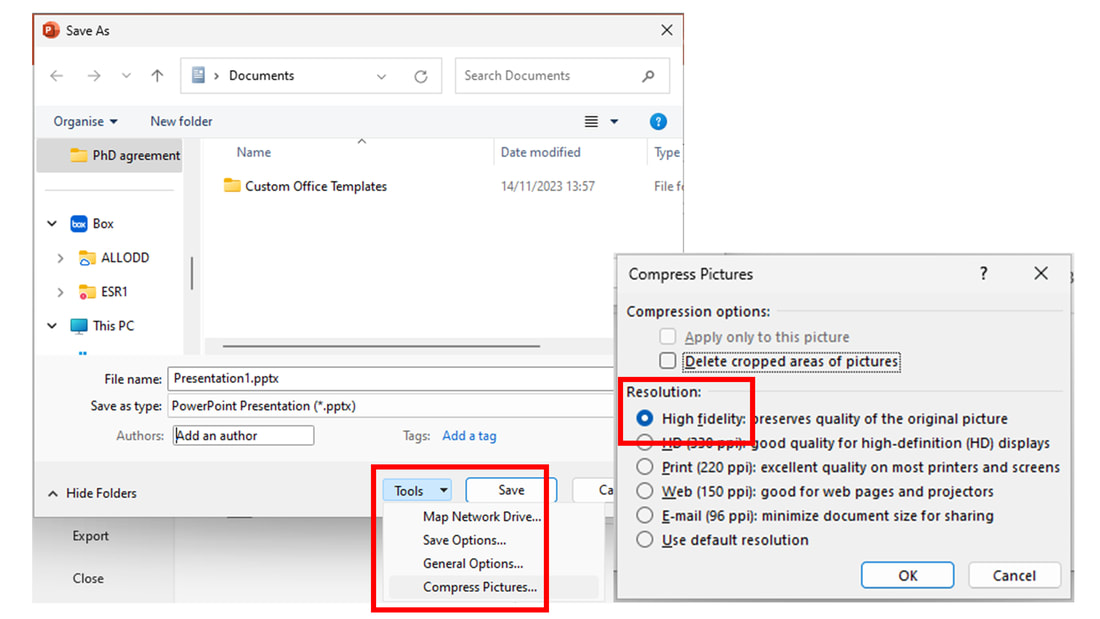
Finally, remember to double-check that you are saving/exporting your PowerPoint file to other formats maintaining the image quality. When “Saving as”, select “Tools” → “Compress pictures” options and ensure that “High fidelity” is selected before saving.
Picture
P.S.: to interconvert between image formats without losing quality, my first choice is https://www.zamzar.com/, although it has some size/amount of conversions limitations in its free version.


​Francho Nerín Fonz
0 Comments

PLUMED Grid Issue

10/4/2022

0 Comments

 
- Problem

I recently noted one of the systems we are simulating suffered from decreasing performance as the simulation progressed. Further investigation revealed it is not the actual performance of the simulation that was lower, but the fact that PLUMED needed increasingly large amounts of time to pre-process the HILLS file for each replica.

This is not an issue for a short-running simulation but for one where the simulation time runs into several μs (such as Coarse-grained simulations), it can completely hinder the trajectory from progressing past a certain point in time.

- Solution

Comparisons with other systems and similar issues mentioned in the issues of the PLUMED github repository, as well as in the PLUMED mailing list, pointed in the direction of a grid-related setting being the cause of the delay, specifically, the fineness/coarseness of the grid. 

The two files below (CORRECT PLUMED INPUT FILE & OLD PLUMED INPUT FILE) highlight a different way of specifying the grid density.

In the `old` file, the grid spacing was manually specified with the GRID_SPACING argument in the METAD block.

In the `correct` file, that line is absent from the file. In the absence of a GRID_SPACING or a GRID_BIN argument, PLUMED is going to use a grid spacing value equal to 1/5 of the Collective Variable (CV) width, for each CV, espectively.

Further testing is required but this value appears to be a robust default and has solved this issue in this particular instance.


CORRECT PLUMED INPUT FILE

C1: RMSD REFERENCE=rmsd_reference.pdb TYPE=OPTIMAL

COM1: CENTER ATOMS=1-122
COM2: CENTER ATOMS=123-244

D1: DISTANCE ATOMS=COM1,COM2

METAD ...
ARG=C1,D1
SIGMA=0.4,0.8
HEIGHT=0.005
PACE=100
LABEL=meta
BIASFACTOR=2.0
TEMP=300
GRID_MIN=0,1
GRID_MAX=4.5,6
... METAD
UPPER_WALLS ARG=C1 AT=4 KAPPA=300.0 EXP=2 EPS=1 OFFSET=0 LABEL=uwall
UPPER_WALLS ARG=D1 AT=5.5 KAPPA=300.0 EXP=2 EPS=1 OFFSET=0 LABEL=u2wall

# monitor the two variables and the metadynamics bias potential
PRINT STRIDE=10000 ARG=C1,D1,meta.bias FILE=COLVAR
​


OLD INPUT PLUMED FILE (do not use!)

C1: RMSD REFERENCE=rmsd_reference.pdb TYPE=OPTIMAL

COM1: CENTER ATOMS=1-122
COM2: CENTER ATOMS=123-244

D1: DISTANCE ATOMS=COM1,COM2

METAD ...
ARG=C1,D1
SIGMA=0.4,0.8
HEIGHT=0.005
PACE=100
LABEL=meta
BIASFACTOR=2.0
TEMP=300
GRID_MIN=0,1
GRID_MAX=4.5,6
GRID_SPACING=0.01,0.01
... METAD
UPPER_WALLS ARG=C1 AT=4 KAPPA=300.0 EXP=2 EPS=1 OFFSET=0 LABEL=uwall
UPPER_WALLS ARG=D1 AT=5.5 KAPPA=300.0 EXP=2 EPS=1 OFFSET=0 LABEL=u2wall

# monitor the two variables and the metadynamics bias potential
PRINT STRIDE=10000 ARG=C1,D1,meta.bias FILE=COLVAR

0 Comments

File Transfer issue & solution

10/4/2022

0 Comments

 
- Problem

Files/folders might become corrupted when transferring between computers or
even disks, in a way that is non obvious to your code so it won't throw a
warning, but might still affect the validity of your data.

- Solution

This problem can occur when transferring files between one cluster and another
but it can also occur at any point when file transfer is taking place, i.e.

 * Transfer file from internal to external disk drive
 * Transfer file from one internal disk drive to another internal disk drive
 * Transfer file from one computer to another over the network

It can even take place when no operations are being performed on the file at
all. This is called bit rot and data centers that specialise in archival and
where data integrity is of high importance, employ specialised hardware and
software to detect and correct it.

For our purposes, what we can do is focus on best practices when downloading
or uploading files from or to a location. This boils down to two things:

(1) Instead of transferring multiple small files and folders it is better to
    transfer a single item instead.

    This can be achieved with a command like

    `tar -czf directory.tgz directory` if we are interested in transferring
    a single directory but can, of course, accomodate as many folders as we
    require.

    For the next step we need a way of generating a unique "identity" for the
    tgz archive. For this we can use a checksum. One way of computing one can
    be seen in the command below:

    `md5sum directory.tgz`

    This will print a string of alphanumeric characters (the aforementioned
    "identity" of the file) followed by white-space and the filename. The
    output of the command can be stored in a file for easier comparison. After
    transferring the file to the destination we can run the `md5sum` command
    there as well and verify the hashes are identical.

    An added benefit of transferring data in a single archive is that it is
    faster, as our file transfer program of choice (e.g. `scp`, or `rsync`)
    only needs to negotiate a single connection.

(2) Alternatively, assuming it doesn't make sense to bundle our data in a
    single archive, we can run `md5sum` on all files to be transferred and
    compare all of the checksums before and after the transfer. This can be
    achieved in many ways but one command that would do the trick is:

    `find -L . -type f | xargs md5sum | sort -Vk2`

    This can be run from a location that contains all of the files you want to
    transfer. An short explanation about the various flags follows:

    `-L`: This instructs `find` to follow symlinks
    `.`: This instructs `find` to search in the current directory
    `-type f`: This instructs `find` to only identify files

    `xargs md5sum`: Run `md5sum` on all detected files

    `sort -Vk2`: Sort the results lexicographically by file name to avoid
                 differences in the default sorting order due to location
                 settings

    The two files produced by the above command (before and after transfer),
    can be compared to ensure the transferred files are identical.

​Panos
0 Comments

Updating Ubuntu packages

12/15/2021

0 Comments

 
sudo apt-get update

sudo apt-get clean

sudo apt-get update

sudo apt-get upgrade

sudo apt-get dist-upgrade

You can also try:

sudo  apt full-upgrade
0 Comments

Ubuntu 20.04 start screen frozen at system check  (Ctrl-C to stop system checks does not work)

12/15/2021

0 Comments

 
1) Install the recommended NVIDIA drivers for your graphics card:

sudo add-apt-repository ppa:graphics-drivers/ppa

ubuntu-drivers devices

sudo apt install [driver_name]
or
sudo ubuntu-drivers autoinstall

sudo reboot

2) you may have to uninstall all nvidia drivers first

dpkg -l | grep -i nvidia

sudo apt-get remove --purge '^nvidia-.*'

sudo apt-get install ubuntu-desktop

sudo reboot

3) Disable 
nvidia-drm modeset option

I discovered that prime-select writes a configuration file which causes the problem. It enables the nvidia-drm modeset option. You can simply undo the change made by prime-select by commenting out this option. It will not be reset, because prime-select only writes this file when it does not exist yet."
Open the file in your favorite editor (vim, nano, gedit, etc.).
sudo nano /lib/modprobe.d/nvidia-kms.conf And comment out the the nvidia-drm modeset option.
# This file was generated by nvidia-prime # Set value to 0 to disable modesetting # options nvidia-drm modeset=1
0 Comments

LiPyphilic: A Python Toolkit for the Analysis of Lipid Membrane Simulations

8/30/2021

1 Comment

 
LiPyphilic is a Python package for analyzing such simulations. Analysis tools in LiPyphilic include the identification of cholesterol flip-flop events, the classification of local lipid environments, and the degree of interleaflet registration. LiPyphilic is both force field- and resolution-agnostic, and by using the powerful atom selection language of MDAnalysis, it can handle membranes with highly complex compositions. LiPyphilic also offers two on-the-fly trajectory transformations to (i) fix membranes split across periodic boundaries and (ii) perform nojump coordinate unwrapping. Implementation of nojump unwrapping accounts for fluctuations in the box volume under the NPT ensemble—an issue that most current implementations have overlooked. The full documentation of LiPyphilic, including installation instructions and links to interactive online tutorials, is available at https://lipyphilic.readthedocs.io/en/latest.

Publication can be found here: 
https://pubs.acs.org/doi/10.1021/acs.jctc.1c00447​
1 Comment

Mounting a new disk on Ubuntu - permissions

7/22/2021

2 Comments


When mounting a new disk on Ubuntu the default permissions are:
rw,nosuid,nodev,noexec,relatime


which don't allow one to execute programs.

The solution is to remove the 'noexec' option with
​
noexec με mount -o remount,rw,nosuid,nodev,relatime /media/mydata3


Alexis

2 Comments

Upgrading to the next Ubuntu  LTS

7/19/2021

0 Comments

 
You can jump between Ubuntu  LTS versions but if you are not on the LTS you 'd have to first update to the next Ubuntu version.
Be sure to fully update your current OS:
  • sudo apt-get update
  • sudo apt-get upgrade
Then try 'sudo apt install update-manager-core' to check for any broken dependencies
Fix any broken problems, usually by removing them and re-installing them.

  • sudo shutdown -r now
  • Then, sudo  do-release-upgrade
0 Comments
<<Previous

    Alexis, Michalis, Danai, Panos, Sotiris, Nastazia, Vassilis, Zoe

    lab group members!

    Enter your email address:

    Delivered by FeedBurner

    Click to set custom HTML

    Archives

    February 2025
    October 2024
    April 2024
    October 2022
    December 2021
    August 2021
    July 2021
    December 2020
    November 2020
    September 2020
    August 2020
    April 2019
    September 2018
    March 2018
    January 2018
    August 2017
    February 2017
    November 2016
    July 2016
    June 2016
    January 2016
    October 2015
    May 2015
    April 2015
    January 2015
    October 2014
    September 2014
    August 2014
    June 2014
    May 2014
    April 2014
    March 2014
    February 2014
    January 2014
    December 2013
    November 2013
    October 2013
    September 2013
    August 2013
    July 2013
    June 2013
    May 2013
    April 2013
    March 2013
    February 2013
    January 2013
    December 2012
    November 2012
    October 2012
    September 2012
    August 2012
    July 2012
    May 2012
    April 2012
    March 2012
    January 2012
    October 2011

    Categories

    All
    64 Bit
    64-bit
    Academia
    Acrobat Reader
    Acroread
    Binding Sites
    Bioinformatics
    Blogging
    Career
    Chembl
    Chemdraw
    Chemistry
    Cloud Computing
    Cluster
    Compounds
    Computational Biology
    Conferences
    Courses
    Crystal Structures
    Databases
    Desktop
    Desmond
    Docking
    Drug Design
    Drug Discovery
    Education
    Email
    Excel
    Fellowships
    Ffmpeg
    Figures
    File Conversions
    Firefox
    Force Field Parameterization
    Fp7
    Free Storage Space
    Glide
    Gpu
    Grant Writing
    Gromacs
    Hpc
    Industry
    Intermolecular Interactions
    Ip Address
    Iphone
    Iso Image
    Jobs
    Library
    Linux
    Lipids
    Literature
    Maestro
    Management
    MAPS
    Materials
    Matlab
    Md Simulations
    Membrane
    Mobile Apps
    Modeling
    Namd
    Network
    Nobel Prize
    Normal Mode Analysis
    Nvidia
    Nwchem
    Off-target Effects
    Pdb
    Pdf
    Peptides
    Photoshop
    Pictures
    Plots
    Postdocs
    Presentations
    Printing
    Problem After Updates
    Programming
    Protein Preparation
    Protein-protein Interactions
    Protocols
    Publishing
    Python
    References
    Review
    Rosetta
    Scheduling
    Schrodinger
    Scripting
    Sitemap
    Solubility
    Ssh
    Teaching
    Trajectory Analysis
    Ubuntu
    Van Der Waals
    Video
    Virtualbox
    Virtual Machine
    Virtual Screening
    Visualization
    Vmd
    Voice Over Ip
    Webinars
    Website
    Writing
    Xmgrace

    RSS Feed

Powered by Create your own unique website with customizable templates.
